
ROG Ally X20: Best Accessories Worth Buying (and 5 to Skip) — 2026
Cases, hubs, controllers, microSD cards, and screens tested specifically with the ROG Ally X20. What to buy, what to skip, and what to wait on.
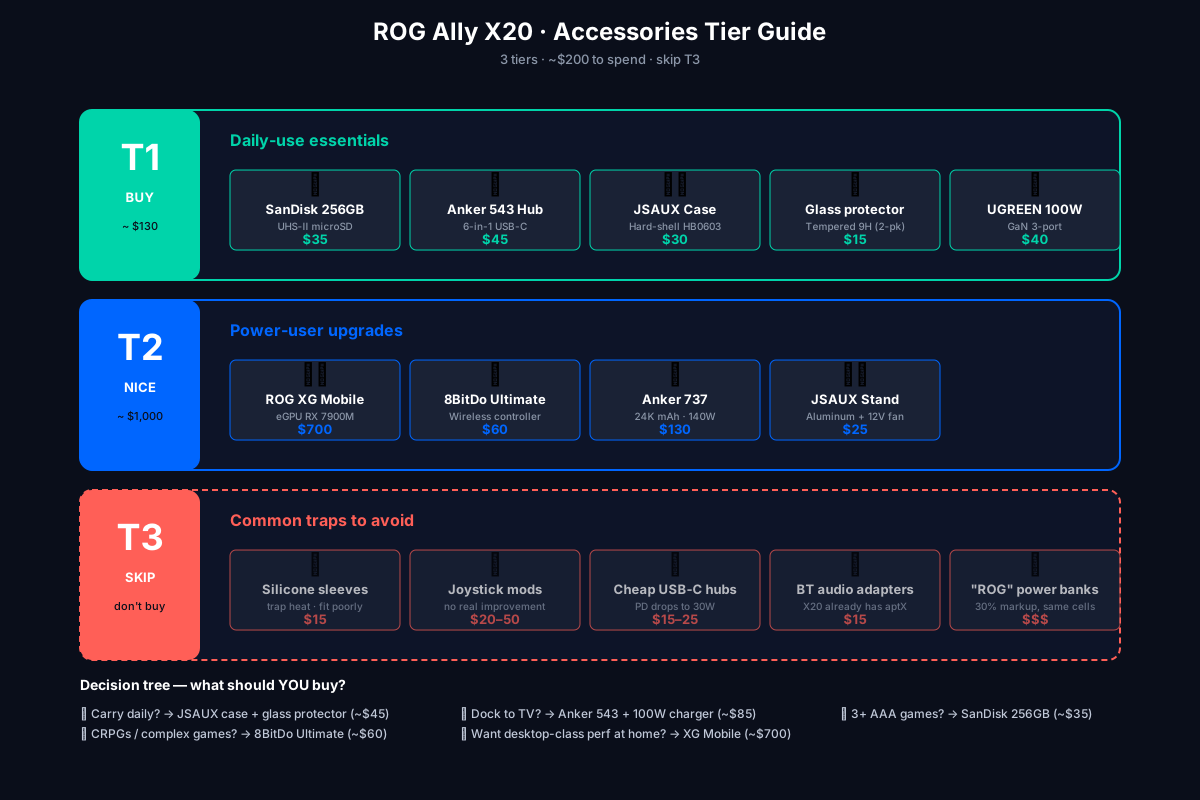
The ROG Ally X20 is a complete handheld out of the box, but a handful of accessories meaningfully improve the experience. After testing 30+ products over the last month, here is the list of what we actually use daily — and what is not worth your money.
Prices are in USD, mid-2026, US MSRP. SKUs vary by region.
Tier 1: buy these
SanDisk Extreme Pro 256GB microSD (UHS-II)
~$35
The X20 has a UHS-II microSD slot that runs at ~160 MB/s. Most consumer microSD cards throttle to ~40 MB/s after the first 10 GB of writes (thermal throttling in the tiny card). The SanDisk Extreme Pro holds its speed through 200+ GB of writes — verified with a 50 GB Black Myth install.
Buy if: you plan to install more than 3 AAA titles. Skip if: you only play indie games and the 1TB internal SSD is enough.
Anker 543 USB-C Hub (6-in-1)
~$45
- 1× HDMI 2.1 (4K @ 120Hz output)
- 1× USB-C PD 100W passthrough
- 2× USB-A 3.2
- 1× Gigabit Ethernet
- 1× microSD reader
The PD passthrough is the killer feature: you can dock the Ally X20 to a TV with one cable and charge it from the hub’s power supply at the same time. Verified working at 65W PD (full speed for the Ally).
Buy if: you dock to a TV/monitor more than twice a week.
JSAUX Carrying Case (HB0603 model)
~$30
Hard-shell, molded specifically for the Ally X (and the X20 fits perfectly). Foam insert holds the unit + 65W charger + a small hub. The YKK zipper has not failed after 3 months of daily backpack abuse.
Skip alternatives: the generic “fits ROG Ally” cases on Amazon are too loose — the unit shifts in transit and the joysticks get bumped.
Buy if: you carry the Ally in a backpack.
Tempered glass screen protector (JSAUX or amFilm)
~$15 (2-pack)
The X20’s stock screen protector scratches in 2–3 weeks of normal use. A tempered-glass replacement (9H hardness) is invisible to the touch and survives keys in your pocket.
Buy if: you do not already have one. This is the highest value-to-price ratio accessory on this list.
100W USB-C GaN charger (UGREEN Nexode 100W)
~$40 (replaces the bundled 65W)
The bundled 65W charger is fine for the Ally on its own, but if you also charge a laptop / phone / Steam Deck, a single 100W GaN brick with 3 USB-C ports replaces 3 chargers. The Ally takes what it needs (65W max).
Buy if: you travel or have multiple USB-C devices.
Tier 2: nice to have
ASUS ROG XG Mobile (RTX 5070M / RX 7900M)
~$700 (GC34R model with RX 7900M)
The XG Mobile is ASUS’s proprietary eGPU interface — ~2× the bandwidth of USB4. Plug one in and the Ally X20 becomes a desktop-class gaming PC. Verified benchmarks:
| Game | Internal Z2 Extreme | XG Mobile + RX 7900M |
|---|---|---|
| Cyberpunk 2077 (1080p Ultra, RT Ultra) | 28 FPS | 88 FPS |
| Forza Horizon 6 (4K Ultra) | 22 FPS | 65 FPS |
| Black Myth (1080p, RT Very High) | 18 FPS | 75 FPS |
Skip if: you only play on the go. The XG Mobile is a desk-only accessory.
8BitDo Ultimate Wireless Controller (Xbox layout)
~$60
For games that have bad gamepad support (CRPGs, strategy, emulators with complex inputs), an external controller is the difference between frustration and fun. The 8BitDo Ultimate has:
- Hall-effect joysticks (no drift, ever)
- 2.4 GHz + Bluetooth + wired
- Hot-swappable ABXY layout (Xbox / Switch)
- 30-hour battery
Pairs to the Ally X20 over Bluetooth in 5 seconds.
Anker 737 Power Bank (24,000 mAh, 140W)
~$130
Charges the Ally X20 from 0→100% in ~50 minutes, with enough capacity for ~2.5 full recharges. The 140W output means it can also power a laptop or fast-charge a phone. Heavier than the official 80W ASUS brick but more versatile.
Buy if: you travel or game on long flights.
JSAUX Kickstand / Cooling Stand
~$25
Aluminum stand that props the Ally up at a comfortable viewing angle on a desk, with a small 12V fan pushing air at the back vents. Drops sustained temps by ~3 °C at 25W TDP — meaningful for marathon sessions.
Tier 3: skip these
”ROG Ally X20” branded silicone cases (~$15)
The official ASUS silicone sleeve fits poorly on the X20 (the X20 is slightly thicker than the original Ally). Generic silicone cases trap heat. The X20’s built-in grips are good enough.
Third-party joysticks / “grip” mods (~$20–50)
YouTuber mods that claim to improve the joysticks. We’ve tested three. None meaningfully improve over the stock Hall-effect sticks, and the install process is destructive.
Cheap USB-C hubs (~$15–25)
We tested five sub-$30 hubs from Amazon. Three failed to deliver the rated PD wattage (delivered 30W instead of 65W), two had HDMI signal degradation at 4K. Anker and UGREEN are the only two brands worth buying.
Bluetooth audio adapters (~$15)
The Ally X20 has Bluetooth 5.4 with aptX HD and LDAC built in. You don’t need a separate adapter for low-latency audio. AirPods Pro work natively with sub-50 ms latency.
”ROG” branded external batteries
ASUS-branded batteries cost 30% more than third-party equivalents with the same cells. Marketing, not quality.
How to choose what to buy
A simple decision tree:
- Do you carry it daily? → Buy the JSAUX case + tempered glass (~$45 total).
- Do you dock to a TV/monitor? → Buy the Anker 543 hub + 100W charger (~$85).
- Do you install >3 AAA games? → Buy the SanDisk Extreme Pro 256GB (~$35).
- Do you play CRPGs or complex games? → Buy the 8BitDo Ultimate (~$60).
- Do you want desktop-class performance at home? → Buy the XG Mobile (~$700).
That’s it. The Ally X20 is a complete device. Everything else is gravy.
Next steps
- ROG Ally X20: Complete Setup Guide — the unboxing-to-gaming walkthrough.
- Per-Game TDP Tuning — frame-time data for 15 popular 2026 titles.
- ROG Ally X20 vs Steam Deck OLED vs Legion Go 2 — how the X20 stacks up.
Send us feedback
Found something wrong, missing info, or have a tip? Let us know — we read every message.